

Mastering GitHub in the Real World: A Conversation with Ayodeji Ayodele
Scaling collaboration and CI/CD on GitHub—branch protections, rule sets, inner source, and Copilot-powered workflows that boost delivery without compromising security.


From secure collaboration and branch protections to reusable workflows and AI-assisted development, GitHub now sits at the center of how software gets built—and scaled—inside modern organizations. In this conversation, we speak with Ayodeji Ayodele—author of the GitHub Foundations Certification Guide (Packt, 2025)—about helping teams move from “using Git” to leading with GitHub: collaborating transparently, automating confidently, and protecting the software supply chain without slowing delivery.
Ayodeji is a seasoned architect, DevOps evangelist, and Agile coach with over 18 years of experience across Financial Services, Tech, FMCG, Manufacturing, and the Public Sector. He’s worked with CIOs and engineering leaders throughout Asia, Oceania, and Africa to drive enterprise adoption of DevOps and Agile practices—helping teams ship better software, faster. Currently a Senior Customer Success Architect at GitHub, Ayodeji partners with large organizations to align GitHub’s tools and workflows to real business outcomes—improving developer velocity, security, and collaboration at scale.
In this interview, we dig into what the GitHub Foundations Certification covers in practice, how to level up from issues and pull requests to governance with rule sets and quality gates, and where GitHub Copilot (and emerging agentic capabilities) can responsibly boost productivity. We also discuss inner source as a cultural shift, strategies for CI/CD that avoid pipeline bloat, and pragmatic approaches to secrets management, dependency hygiene, and build provenance.
Looking ahead, Ayodeji shares how AI is reshaping developer workflows, what skills will keep engineers relevant, and how to cultivate a documentation-first, asynchronous culture across time zones.
You can watch or listen to/download the full conversation below—or read on for the complete transcript.
1: What gap does your book, GitHub Foundation Certifications Guide, fill for today’s developers?
Ayodeji Ayodele: My book bridges the gap between knowing Git basics and truly mastering GitHub as a collaborative, secure, and scalable platform. Many developers know how to commit and push code, right? But sometimes they struggle with collaboration, automation, and security, so I believe the book helps with that. Secondly, the GitHub Foundation certification is a great benchmark, but in the past there wasn’t a practical, hands-on guide to help people prepare and apply those skills in real terms, given the fact that GitHub certifications in general are just barely two years old. So we don’t have that many resources out there. I wanted to create a resource that’s not just exam-focused, but also helps developers become confident contributors in any organization. So I wrote this book to help developers go from “I can use GitHub” to “I can lead with GitHub.”
2: Your book promises to take readers from fundamentals to advanced GitHub features—from better collaboration and project management to secure workflows and even AI-powered coding with Copilot. Now, as you said, many developers use GitHub daily but may not be leveraging features like issues and pull requests. How can even experienced developers benefit from this book, and what are some important GitHub best practices or features that even seasoned engineers often overlook?
Ayodeji Ayodele: Yes, you’re correct—even seasoned engineers often miss out on GitHub’s advanced features that can supercharge collaboration and code quality. For example, GitHub Copilot—our latest product—is a massive game changer in the developer world, particularly if you’re using it both within the IDE and on the github.com platform. So GitHub Copilot is not just for the IDE; you can use and benefit from the great values that Copilot brings even on the github.com platform. Not just that—it supports multiple IDEs, up to about six, which means you don’t have to learn a new IDE for some of those other AI products in the software development space today. You can bring those models and still use the development environment you already use today.
So Copilot supports multiple models—you can use all the GPT models, you can use the cloud sonnet models, and there is also the Google Gemini models as well, all within GitHub Copilot. And then there are the agentic capabilities that we now see as the future of AI in software development—whereby you can have this huge backlog of issues, assign those issues to Copilot, and Copilot will spin up its own separate environment, triage the issue, and write the code that fits the description to implement that issue. That may be a feature request, or it may be fixing a bug and things like that. And going down the line, there are so many other things coming out in the next few months around helping to improve code quality as well. There is also a feature called GitHub Advanced Security that helps people manage vulnerabilities, and you can also bring in vulnerabilities that are reported by other security tools and even fix them within the same platform. Those are things you can use today.
Then, in terms of best practices, we’ve got pull request summaries. In terms of improving the semantics for pull requests and titles, we have rule sets for protecting branches and for protecting workflows when you run them—there’s a huge number of different rules you can apply to improve governance and to improve CI/CD automated checks—leveraging issues for transparent communication and collaboration as well. Finally, mastering these tools elevates you from an individual contributor to being a team enabler. GitHub isn’t just a code repository—it’s a platform for building better software together.
3: As we know, open-source code now underpins almost everything. Given this ubiquity, what advice do you have for developers to harness open source effectively?
Ayodeji Ayodele: Open source is the backbone of modern software. Contributing is the best way to learn—contributing to open-source projects helps you grow and give back to the community. In fact, roughly 50–60% of software today is built in open source or on top of open-source components and libraries. So open source is integral to how we build software in the world today. I’d say start small—fix typos in public repositories and improve documentation. You’re just like everyone else, and the GitHub platform is home to over 150 million developers across different skill sets and interests, so you’ll always find a space that fits you. If you’re worried your contribution won’t meet standards, there are tools to help. GitHub Copilot—free for open-source projects—can suggest or improve code; after you’ve written code, you can ask Copilot to review it for standards.
We also have GitHub Advanced Security, and many of its security components are free for public repositories. GitHub takes its role as the home where the world builds software seriously, so we provide security and AI-powered tools to open-source communities at no cost. Beyond that, there’s the GitHub Community Discussions space where people suggest improvements to GitHub itself—join in and learn by doing. Open source is a two-way street: you give, you learn, you grow.
4: How can engineers get involved in open-source projects on GitHub while balancing the risks and rewards of depending on community-maintained code?
Ayodeji Ayodele: Rephrasing that: if you want to get involved, start at github.com/explore. You’ll also find /trending, where you can see repositories gaining popularity—sometimes a new repo skyrockets because it’s exactly what everyone was looking for, whether a library, a design template, or a scaffolding component. There’s no judgment—you’re just like everyone else among 150 million developers on GitHub, spanning all experience levels and interests. About the risks: you may worry your contributions aren’t up to standard, or fear embarrassment. There’s no shame.
Use GitHub Copilot—currently free for open source—to suggest or improve code, and even ask it to review your code for standards after you’ve written it. Plus, GitHub Advanced Security offers many features free for public projects. As part of our commitment to the open-source community, we provide these security and AI-powered tools free to help you get started and build with confidence.
5: How can the principles of open source—such as open collaboration, transparency, fork and pull—be used within companies to improve teamwork and code reuse?
Ayodeji Ayodele: Bringing open-source practices inside companies—what we call inner source—breaks down silos and accelerates innovation. Transparency, forking and pulling workflows, and opening discussions all drive better code and teamwork. If companies are looking to get started, the InnerSource Commons website has very useful resources; my colleague Yuki in Tokyo is involved there.
To mitigate common issues like unclear ownership, be transparent and make it easy for people to contribute: add a CONTRIBUTING.md file with clear guidelines, explain what the project is, what it does, and where help is needed.
Use GitHub Discussions internally so people can collaborate and ask questions, and look to the GitHub Community for inspiration on how a discussion forum works. Leadership support matters, too—secure buy-in and celebrate contributions, whether at the community level or with incentives like badges or prizes. Inner source turns every developer into a potential innovator, not just a code consumer.
6: Have you seen any challenges in adopting this inner source model, and what strategies can help overcome them?
Ayodeji Ayodele: Resistance to change is common—people feel comfortable with the status quo.
Start by explaining what inner source is and keep the environment judgment-free so everyone feels supported.
Provide clear guidelines on what can be done, and communicate—over-communicate—so no one is surprised by the rollout.
Keep everyone in the loop on what you’re doing as a program, when you’re starting, and how you’ll deliver the change.
And don’t underestimate leadership involvement; having leadership support is critical to driving the change internally.
7: Modern software teams automate extensively. How critical is it for developers to integrate CI/CD pipelines and automation into their workflow?
Ayodeji Ayodele: CI/CD is one of my my favorite topics. CI/CD is hard. For example, you can introduce pipelines. In GitHub we have 3—one for the build phase, one for the test phase, and one for the deployment phase. And so when you think about CI/CD, you think of a process and a practice or a methodology that helps you automate all of those steps from the point where you collect requirements and analyze what needs to be developed. Then you build. You want to build and test as you build. So test-driven development—if that’s the model you follow—will require that you build your test before you write your code. And sometimes what we also do is that you write your code and write your test, depending on your methodology—whether it’s an agile methodology or something like that. So, for me, CI/CD is a practice and a set of standards that you want to have within your organization that helps you to be able to automate all of the very tedious, boring, repetitive tasks that you would ordinarily have to do by hand.
And when you think of CI/CD, you want to think about the entire journey of software development— so from the point of having an idea, building a prototype, and then having a feature request that you want to design, you want to test that feature, you want to deploy it and make that feature available to your customers. That’s the journey—it’s a life cycle. And when you think of life cycles, you’re thinking in terms of product management. You’re thinking about getting your ideas and turning those ideas into a reality for customers, for your users. And if you are going to really do that at scale, you cannot do it by having people on your team run commands manually on their terminal—copying configuration files here and there. You want to eliminate the room for human error. You want to make sure it’s repeatable. You want to make sure that the process that you follow in Team A is the same process Team B follows.
So CI/CD allows you to have those standards built so that your teams are able to build with confidence, and you’re able to ship more frequently. So the more frequently you ship a feature, the faster you are going to meet customer needs. And so CI/CD gives you that leverage to repeatedly ship features to your customers and not have to wait so long just because you’re following a very careful manual process. And the second thing I want to say is that CI/CD helps you to test early, test often. When you test early, you reduce the cost of the bugs—you reduce the cost of fixing them because you can discover them very early in the production life cycle. And when you do that, it’s cheaper to fix as opposed to discovering a bug after you have launched a feature to production. And then the last thing about CI/CD that I want to highlight is that you want to make sure that it’s repeatable. And so you want to write your configuration as code so that you are able to repeatedly do the same thing over and over again and in the shorter time possible. And that just lets you to ship faster and safer.
There are a number of things that you can do to improve the CICD pipeline. You can introduce automated quality gates within your pipelines so that there are quality checkpoints to prevent low-quality code from going into your main branch. And for that, for example, in GitHub today, we have code scanning tools—you know, GitHub Advanced Security is available to scanning tools today. And that helps to set up a rule set that helps you to scan your code for vulnerabilities. And you can then block a pull request from being merged based on that. You can also block pull requests by checking for tests, checking that your tests are passing, checking that your build pipeline—like the build process—completes and is successful. And then checking that the deployment pipeline meets all of the criteria or standards required before you actually deploy to production.
And so once you have those things set up—essentially a very solid, repeatable process with automation and with quality gates in place—you are going to be able to confidently ship production-grade software again and again. And when you centralize CI/CD—like, for example, you can have it built as reusable workflows—you are able to introduce them across all your repositories whenever you want to merge a pull request, and you know you have a central place where you can manage the quality gates, the rule sets, and the different things that need to be checked across your organization. This gives you a very repeatable process across the organization—across different business units—and you’re able to have that single pane of glass that lets you to see every single repository and the quality within them. So CI/CD is integral to software development today—I would say it’s an integral part of software development, yeah.
8: What guidance would you give for using tools like GitHub Actions to streamline testing, integration, and deployment, and to avoid “pipeline overload” while maintaining software quality?
Ayodeji Ayodele: I would say start with one of the most important points around deployments—which is continuous deployment. If you’re working in an organization where you are able to build a great testing culture—so you are building both unit tests, and you have automated tests running end-to-end, and you are able to bake quality into your check-in process—then you can enable continuous deployment so that you have frequent deployments to production without, you know, requiring someone to push a button after every merge into main. And the reason is that you have discipline, and you have the culture and processes to ensure that they are repeatedly passing. So when a pull request lands on main, the deployment happens automatically—so that is one.
And another point is that release gates help with staging: having an environment that lets you validate in a staging environment before you deploy to production. That’s really helpful when you have many teams and the product is really important and there are key delivery timelines, so release gates make sure that when you are in the staging environment it’s actually very close to the production environment. You can do some scale testing and even chaos testing in that staging environment. Now, in terms of avoiding pipeline overload, what I’ve seen is that when teams begin to add more and more and more—like, you know, “Let’s add this because it’s nice to have”—you’ll quickly get to a point where your pipelines take a long time to run. That means you’re blocking people from shipping because you now have this huge, long pipeline. So what I would say is that you want to keep your pipelines small in terms of the number of steps for a particular task. And when you break down your tasks—like, for example, your unit tests are separate—you want to break integration tests separately, and then you have performance tests and other tests that you want to do. And by breaking these things down into a pipeline for a particular purpose, you are able to keep them short and small, so that when you are running the pipeline for unit tests, it’s not including all the steps that you need for, say, integration tests.
So you want to break them down, and you want to make sure that they are not blocked by each other. For example, let’s say you want to run a build pipeline, and then you also want to run unit tests and integration tests. You should be able to run them in parallel such that when your build is done and the unit tests are done, then you can do code coverage and other types of analysis. And then you can go ahead and, you know, do the integration tests while, you know, the unit tests are done—rather than having them chained where you have to wait for one to finish before the other can begin. So run in parallel—parallelization lets you to be able to get things done faster. The other thing I would say is: cache artifacts between steps. When you are building artifacts, you want to be able to reuse them easily between pipelines or even within a pipeline. And so when you cache artifacts, it saves you the time it takes for a build to start from scratch every time.
For example, in Node.js, you can cache the dependencies; in Python, you can cache the dependencies; in Java you can cache dependencies—you can cache them across runs. And this makes sure that if there’s a small change you’re making, you don’t have to start from scratch. And then, finally, when you’re thinking about CICD, you want to think about making it reusable—so reusable workflows. That way, when you have standard, common steps, you can reuse them across teams. And then also make it modular. So when you have a task, you want to have a complete task that—once that task is completed—then you can run the next task in parallel or the next task that depends on the outcomes of the previous tasks. And so with all of that, I would say, yeah—automate the boring stuff. Focus on what makes your products unique.
9: In your experience, what branching strategy works best for teams on GitHub?
Ayodeji Ayodele: I have a preference, so disclaimer first: this is an opinionated preference. For me, I prefer trunk-based development. A lot—because with the trunk-based development model, your history stays clean and you have only one single branch at every point in time. And you might ask, what if I need to go back in time and roll… the Git flow, which is always, you know, very good… the best branching strategy is the one that your team understands and they can follow consistently. Gitflow can work for… you know, complex release cycles and… and you want to have different release version numbers, and you jus… consistency and clarity matter, that’s—uh, what I would say, yeah.
10: Now we know what you prefer personally. But for teams—what would you recommend for them? Would it be trunk-based development or Git Flow?
Ayodeji Ayodele: Yeah, I would say trunk-based development… most—that’s your speed because you… you know that you know how to… You can quickly make quick changes, validate… collaborate. So that is particularly important for teams, yeah.
11: Let us talk about the pros and cons of branching strategies. Could you quickly summarize what trunk-based development is best suited for versus Git Flow?
Ayodeji Ayodele: If you’re building software and want to release features more often—say, once every day—with frequent changes to production or very short sprint cycles, trunk-based development is the best approach. If you tend to have multiple release versions in production—or you have the kind of application where customers expect separate versioned releases, then Git Flow is good so you can keep those separate branches of the same codebase and use them regularly. So yeah, that’s what I’ll say.
12: With supply-chain attacks on the rise, security is a huge concern. What steps should developers and teams take on platforms like GitHub—enabling two-factor authentication, etc.—to prevent such attacks?
Ayodeji Ayodele: Security is everyone’s job. Every role needs to consider security as very important—not just the security architect. Every developer needs to factor security into the code they build, so use the built-in tools you have on GitHub to protect your code at every stage. For example, at the development stage, GitHub push protection helps block secrets from leaking from your IDE when you’re about to push to the remote—so that helps even before you get to CI/CD. When you’re about to merge, there are rule sets to protect code—for example, from accidental deletions of branches—and from dependencies and vulnerabilities. You can run vulnerability scans out of the box with a single-click default setup for code scanning. For secret scanning, you can scan code at rest or even code in PRs.
There are also security configurations you can apply to different sets of repositories—and you can have code scanning run on a predetermined frequency, whether weekly or monthly, across the organization. There’s also Dependabot, which looks at your dependencies and recommends updates; it tends to keep dependencies up to date and even opens automatic pull requests you can review and merge. For software supply chain integrity, you can implement build provenance using SLSA (a build attestation standard)—GitHub Actions is always on SLSA Build Level 2. Within GitHub, you can generate attestations to prove dependencies are valid—like a blockchain of your deployments—to show nothing was tampered with; you can store that on GitHub or as an artifact in Artifactory or other external package managers.
Definitely use two-factor authentication. GitHub supports that, and you can use single sign-on with Okta or Azure AD. You can also use Teams to manage roles, create custom roles with different permissions, and make sure every commit is signed and verified to add confidence that the person changing the code is the right person.
13: How do Git and GitHub enable effective asynchronous collaboration across different time zones and teams?
Ayodeji Ayodele: Yep, like you rightly hinted—yes, I work remotely. In fact, Git… for asynchronous teamwork. It helps. You don’t have to be in a meeting to make changes on GitHub, and clear communication is built into the platform. You can use GitHub Projects for planning. You can track status for each task—who’s working on what—and then it also provides a timeline view where you’re seeing the timeline for the different tasks. That helps when you have teams in different parts of the world, even people in the U.S. and [elsewhere]. GitHub Issues is that central place where we collaborate on a particular issue—you can create an issue to capture an idea, a bug, or a feature request. You can tag people, add labels that are customized to the way your organization works, and then you can create task lists within the issue. So it helps pull requests as well—it comes out of the box.
Pull requests is one very fantastic feature of GitHub, and I think… Peter… You can also use GitHub Discussions for discussions that are not specific to a particular issue or pull request—discussions are really trackable. You can also use discussions for social collaboration. Yep, these are the different features I can think of now. And then there’s documentation—wiki pages and README files. You can also create road map views and use that to collaborate on different projects.
14: Are there any secret tips you’d like to share—little things we might have missed—about GitHub collaboration in a remote-team context?
Ayodeji Ayodele: Yeah, absolutely. And the fact that you work with different people across different time zones means documentation becomes very important. Even though they’re developers—and we’re geeks—sometimes we just want to write in, you know, shorthand and short comments. But if you’re working asynchronously, you want to provide context in your issues and pull requests so people can understand the “why” and the “how” behind changes without a meeting. Use templates for issues and PRs, and follow a consistent convention for titles and descriptions. Use labels and project boards to make status clear at a glance. Encourage code owners and reviewers to leave actionable comments, not just approvals. And you want to have regular check-ins with your team—maybe you have a sync once a week or once in two weeks—so people feel connected while still relying on async work.
15: You have a background in DevOps and change management—how do you see platforms like GitHub influencing team culture and process?
Ayodeji Ayodele: GitHub is a fantastic tool for collaboration—especially when you want to bring people from silos to becoming more collaborative. In the development world, we call GitHub “social coding” because you’re writing code and working together with people. There’s transparency: when you’re making changes, you’re seeing what others are doing, and others can see what you’re doing—that transparency is really important for providing feedback. When you’re reviewing code, you can add inline comments, and that feedback can also drive continuous improvement. When you put automation in place, it saves people time, and they can use that time to work on bigger problems—so having that automation helps teams become more collaborative. People feel this developer happiness when they use GitHub in a transparent, collaborative way. Collaboration is a very core pillar of how the platform is built and shaped. Yeah.
16: Are there any common pitfalls teams should avoid when integrating GitHub into their DevOps workflows?
Ayodeji Ayodele: Over-customization is one I see often. Sometimes platform engineering teams or DevOps engineers want to customize everything, and that can take away from the standard way of doing things. There’s overhead for you to maintain the customization, and overhead for the people who have to use it. You want to reduce that so your end users and consumers can use your application or software more easily—so avoid over-customization. Neglecting documentation is another. I’ve seen people create pull requests with great changes but little or no context.
Today, with GitHub Copilot, you can easily summarize the changes you’ve made in the pull request—beautifully—so try not to neglect documentation. Also, skipping retrospectives is a pitfall. Retrospectives help you look at what you did well, what you didn’t do well, and where you can improve—so don’t skip them. Over-customizing your platform, neglecting documentation, and skipping retrospectives are common pitfalls—and culture matters. The right tools can change what’s on your menu.
17: Let’s talk specifically about Copilot and the future of coding. Is AI-assisted coding a boon to productivity—that’s the debate. From your perspective, how is AI changing the day-to-day work of developers?
Ayodeji Ayodele: I’ve been in the industry for about 20 years writing software, and I’ve never seen anything like this before. It fundamentally improves and changes the way we write software today, and it’s not just a buzzword—AI has come to stay. We’ve seen people reduce the time it takes to introduce new features; we’ve seen improvements in the quality of the code as well—higher test coverage and fewer vulnerabilities when they scan the code.
On GitHub, we build GitHub on the GitHub platform—Copilot is the number one contributor with the highest number of contributions per week and per month today on the GitHub platform. We believe in the platform and in what AI has come to improve. The agentic capabilities I’ve seen today—if I had them coming up earlier in my career—I would achieve a lot of great things.
So if you’re not using AI today, you’re likely playing catch-up, because AI allows you to move at a much faster rate and safely, in a secure manner. AI is now the pair programmer. You’ll be seeing agents—so you can assign some complex or boring work to an agent within GitHub, the GitHub platform. You can have multiple issues in your backlog, and an agent can hand off from one agent to another, and GitHub Copilot has different agents. We will also be releasing many new agents, so you’ll have agents as your pair programmer or even your teammates. In addition to a development team of humans, you’ll now have these agents alongside the team, doubling and tripling their output and their throughput compared to those who don’t have AI today, yeah.
18: Do you foresee AI assistance becoming a standard part of development? How should developers—especially junior engineers—take advantage of tools like Copilot while continuing to hone their coding skills?
Ayodeji Ayodele: GitHub Copilot not only helps you write code—it helps you understand the code. You can ask GitHub to get a better understanding of the codebase. Let’s say you inherited it from a senior developer; Copilot can help you understand the different components of the code and what it thinks the code does. It can explain concepts for you—coding terminologies and development practices—and even identify components in the stack you use: “These are the components you use here.” You can ask questions such as, “How can I test-run this?”—and GitHub Copilot can help you go through that flow. Secondly, it helps with prototyping. You’re given the requirements, and you need to quickly prototype and experiment—an important task many people underestimate that developers do today.
From translating ordinary business needs into what software should do, Copilot can help with ideation, brainstorming, and prototyping as well. These are very good areas where a junior developer can really benefit. It also ensures the code follows certain coding practices, which means a junior developer can work as if the person is an experienced senior developer—because they have that assistant by their side. So you can solve problems with AI, not just write code.
19: Let’s talk about caveats a little bit. Can Copilot negatively impact code quality? What is your take on this?
Ayodeji Ayodele: Oh, that’s a tricky one. Yes and no. Yes—in the sense that if you don’t know what you’re doing and something goes wrong, it will be hard for you to understand the code base and figure out how to fix it yourself. And if you find yourself in a remote area or you don’t have internet access, or you’re on a system where AI is not allowed—say, you’re building some, you know, covert, highly secure environment software—how will you be able to cope? So you also want to make sure that you understand the language it’s written in, so that you can triage some of those things. And in terms of whether AI in general can introduce bugs in the code—there are times when, if there is no good prompting, Copilot can build (or AI tools can build) code in a different way, because the model has its own preferences. You can read up on how to write good prompts for AI tools—for GitHub Copilot.
Then there are times where you can say, “I want you to do it in this particular way, and I want you to use these libraries,” because typically there is more than one way of solving a problem. If you have a kind of library that is homegrown or approved for use, you can create what we call Copilot Instructions to instruct Copilot to write code in a way that is accepted by the organization you’re working in. And whenever it introduces bugs, there is a review agent you can use to review the entire code base itself and review it against best practices—and even against your internal standard practices—within an enterprise or a team.
20: How do you feel teams can use AI coding assistance responsibly to ensure the generated code meets quality and security standards?
Ayodeji Ayodele: Good question. Not all AI coding tools are the same, and the dependency models you use can determine what kind of responsible use is available. For example, GitHub Copilot—being part of the Microsoft ecosystem—has multiple layers internally for the responsible use of AI. First, it looks at the kind of prompts you’re sending, checks them against responsible-use standards, and sanitizes them. When it sends back the code, it looks at that code to be sure it’s a responsible use—making sure there are no personal data leaks or similar risks—within the system itself, depending on which AI system or product you’re using. And for the human being, I would say always review—and then use automated checks—because the volume of what AI will be contributing to your code will increase.
That means it will be time-consuming to review everything manually, so you want to reduce that burden with automation while still reviewing. Make sure a lot of the review work has been done in advance with automated checks, and treat Copilot as a collaborator, not a replacement—that’s why GitHub calls them “co-pilots,” not “the pilot.” Someone is still in charge, driving what it does, yeah.
21: Continuing to talk about AI and its impact—The latest Stack Overflow developer survey shows a paradox – nearly 80% of devs are now using AI tools in some form, yet only ~3% highly trust the answers from AI. In fact, 75% of developers say they turn to a human colleague when they don’t trust an AI’s answer. How do you envision the collaboration between developers and AI tools going forward? For example, will coding become more about validating and refining AI-generated solutions?
Ayodeji Ayodele: Yeah, I think I’d be keen to see that report and see, you know, what tools they’re using. It would be good to see a breakdown of that.
Because I feel it may not be the same experience for every tool. With that said, this revolution itself—right? Oh, you know, this is another time in human history when you look back and see that a huge change has occurred. This is another change. And there is, as expected, a bit of resistance when change comes. Some people have not used it, and some people who used it don’t understand exactly everything it does and how it runs in the back end. And it’s difficult to trust what you don’t know—how it runs or how it works. You may need to understand the design and the architecture of that AI tool to know what’s going on under the hood.
And many of these AI tools also give flexibility to configuration—so you can configure what the AI is able to do, and that way you can control and decide the way the AI works and what it’s allowed to see. For example, with GitHub Copilot, there’s a set of files you can exclude so the AI will never look at those files—maybe they’re secret files and things like that—and it will never look at them, even in your codebase. So this helps. And then knowledge sharing as well—some people love it because they’ve used it very well and they’ve seen the impact it has had on their productivity. So knowledge sharing will help the community; it will help people balance up and understand things better—how some of these tools work. So, yeah, I’ll encourage knowledge sharing, and then understanding the design and the architecture and the documentation on how it runs.
22: That’s some really good advice. But how do we ensure that junior devs still learn critical thinking instead of blindly accepting AI output? Because that’s a genuine risk the community is facing at this time.
Ayodeji Ayodele: Yes—I would say use AI as a learning tool, not a crutch. Use AI to understand and know things better. And you can also use AI to augment knowledge. At times, knowledge is scattered within an enterprise in different sources, and it’s hard to have access to—or remember—all those areas—of course we have other platforms like SharePoint, Jira, ServiceNow, and things like that. Use AI to augment and consolidate this knowledge base so that people can have a richer source to derive information from. Consolidating the knowledge base can really help.
And of course you can also have meetups; they can really help to improve knowledge sharing. You can also come and showcase what you’ve built, and people can, ask questions to—maybe, you know—test your assumptions for the software you built, and that can help. AI itself can help in the scaling of that—in bringing all of it together. In building that, you can also capture notes and conversations and improvements, suggestions, and interpret them back into the code. Or document those comments and feedback in your repositories—AI can help with that for you—but humans have to ask the right questions, yeah.
23: There’s a lot of debate about whether AI makes people more productive or makes them worse—you know, more dependent on them. And I think at this point it’s a bit pointless to go into that debate. But complex, creative problem-solving is still uniquely human. In the same Stack Overflow survey, roughly 40% of developers said that AI tools performed poorly on complex tasks. Having said that—since the space is moving fast and there are developments and improvements—given AI’s current limitations, what uniquely human skills should developers focus on strengthening now to remain relevant?
Ayodeji Ayodele: First and foremost, there was that comment about AI not being able to perform complex tasks. In the last three months, I’ve seen a major change. The models have evolved and people are beginning to say, “You know what, this is going really magical.” So I’ve seen some AI models out there that can perform really complex tasks. There are some models that take a shorter time and just give you—on the fly. So there are different strengths to different models.
So yes, AI can help with complex tasks, but AI can’t replace creativity. AI cannot replace empathy. It cannot replace problem-solving. These are innate skills for humans. I know I’ve seen some people trying things like that, but I don’t think they can ever be like humans. So I don’t think AI will replace human beings, you know. So you want to focus on creativity, on communication, on design thinking, and, you know, adaptability as well.
24: What core competencies will define a successful developer in the next 5–10 years as tools like Copilot evolve?
Ayodeji Ayodele: So the developer role is evolving—more than just writing code, it’s about understanding systems, collaborating across functions, and adapting as tools change. You want to build strong fundamentals, but stay curious and keep learning new paradigms, frameworks, and practices as they emerge. Communication and collaboration matter a lot—being able to explain your thinking and work well with others. So the most valuable skill in tech isn’t coding—it’s learning.
To build practical mastery of Git and GitHub— from version control basics to collaborative workflows, secure automation, and AI-assisted productivity—check out GitHub Foundations Certification Guide by Ayodeji Ayodele (Packt, 2025). Through step-by-step labs, real-world projects, and exam strategies, it helps you prepare for the GitHub Foundations certification while adopting best practices for issues and pull requests, GitHub Projects, privacy and security controls, and GitHub Copilot—so you can level up your skills and ship better software, faster.

Here’s what some readers have said:
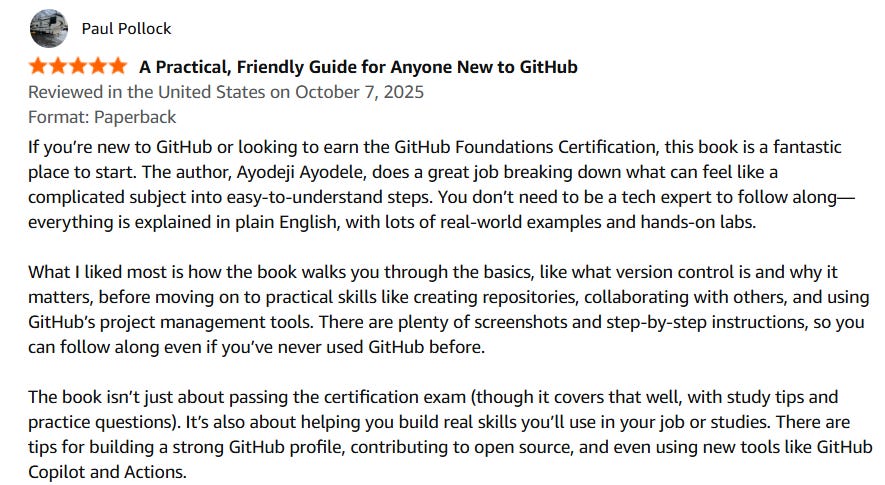
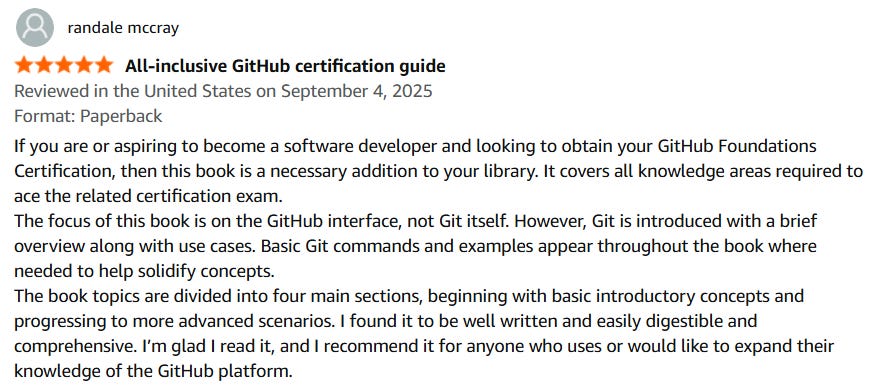
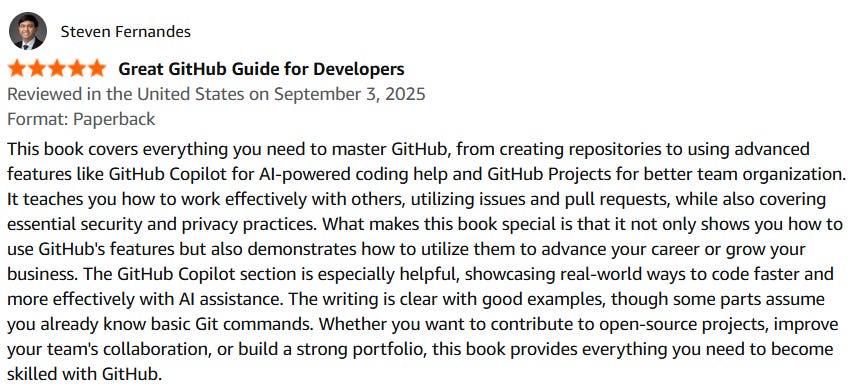
 | A guest post by
|
Excellent analysis, Ayodeji, thank you for articulatin so clearly how GitHub is truly central to modern software development, especially the move from simply using Git to leading with it. I particularly appreciate your insights on AI reshaping developer workflows and the need for a documentation-first, asynchronous culture; it really makes one think about how public policy can support these evolving tech environments responsably.