

Go + Eino ADK Quickstart: Master Core AI Agent Design Patterns
Build composable, interruptible multi-agent workflows in Go with Eino’s unified Agent abstraction—ReAct, WorkflowAgents, Supervisor, Plan-Execute-Replan, and DeepAgents.

With thanks to AI Engineer Gerald Parker for his technical review.
Eino ADK, pronounced “I know”, is a multi-agent development framework designed for Go, developed and hardened in real-world use at ByteDance. Its design philosophy is “keep simple things simple, and make complex things possible”. Open-sourced at the start of 2025, Eino’s promise to Go developers is they can focus on implementing business logic without worrying about underlying technical complexity.
In this article co-written with the team behind Eino, we will discuss:
What Eino ADK is
Core agent patterns in Eino along with real use cases
Example code for building a simple project manager agent
Introduction to Eino ADK
Agents are quickly becoming the mainstream way to deploy LLMs, from intelligent customer service to automated office work. With them, the following pain points are emerging:
LLMs are not bridged well with business systems, resulting in agents that can only engage in “empty talk.”
Lack of state management causes agents to frequently “forget” when performing tasks.
Complex interactive processes increase development difficulty even further.
Eino ADK was created to provide Go developers with a complete, flexible, and powerful agent development framework that addresses these core challenges head-on.
Recap: What is an Agent?
You can think of an agent as an independent, intelligent entity that can understand instructions, perform tasks, and provide responses – capable of autonomous learning, adaptation, and decision-making. Its main functions include:
Reasoning: An agent can analyze data, identify patterns, and use logic and available information to draw conclusions, make inferences, and solve problems.
Action: An agent takes actions or executes tasks to achieve goals based on decisions, plans, or external inputs.
Observation: An agent autonomously collects relevant information (for example, through computer vision, natural language processing, or sensor data analysis) to understand the context and lay the foundation for informed decision-making.
Planning: An agent can determine necessary steps, evaluate potential actions, and select the best course of action based on available information and expected outcomes.
Collaboration: An agent can effectively work together with others (human or other agents) in complex and dynamic environments.
Any scenario that requires interaction with a LLM can be abstracted as an agent. For example:
An agent for querying weather information
An agent for booking meetings
An agent capable of answering questions in a specific domain
What is Eino ADK?
Eino ADK is a complete system for developing intelligent agents. It breaks down complex AI applications into independent, composable intelligent agent units, allowing developers to build agentic systems the way they would assemble Lego blocks.
Its features include:
Less glue code: Unified interfaces and event streams make complex task decomposition more natural.
Rapid orchestration: Pre-built paradigms + workflows allow you to build pipelines in minutes.
More controllable: Interruptible, resumable, and auditable, making the agent collaboration process “visible.”
Eino achieves this through unified abstract interfaces, flexible composition patterns, and powerful collaboration mechanisms.
The Core: Unified Agent Abstraction
The core of ADK is a concise and powerful agent interface:
type Agent interface {
    Name(ctx context.Context) string
    Description(ctx context.Context) string
    Run(ctx context.Context, input *AgentInput, options ...AgentRunOption) *AsyncIterator[*AgentEvent]
}
Each agent has:
A clear identity (Name)
A clear responsibility (Description)
A standardized execution method (Run)
This provides a basis for discovery and invocation between agents. Simple Q&A robots or complex multi-step task processing systems can be implemented through this unified interface.
Core Agent Patterns
The following sections lay out the core patterns that make up Eino ADK. Each will be introduced, explained, and then brief skeleton code demonstrated.
ChatModelAgent: The Brain
ChatModelAgent is the most important pre-built component in Eino ADK. It encapsulates the interaction logic with LLMs and implements the classic ReAct (Reason-Act-Observe) pattern. The process is as follows:
Reason: Call the LLM.
Act: The LLM returns a tool call request.
Act: ChatModelAgent executes the tool.
Observe: The tool’s result is returned to the LLM, which continues to generate based on the previous context until the model determines that no more tool calls are needed.
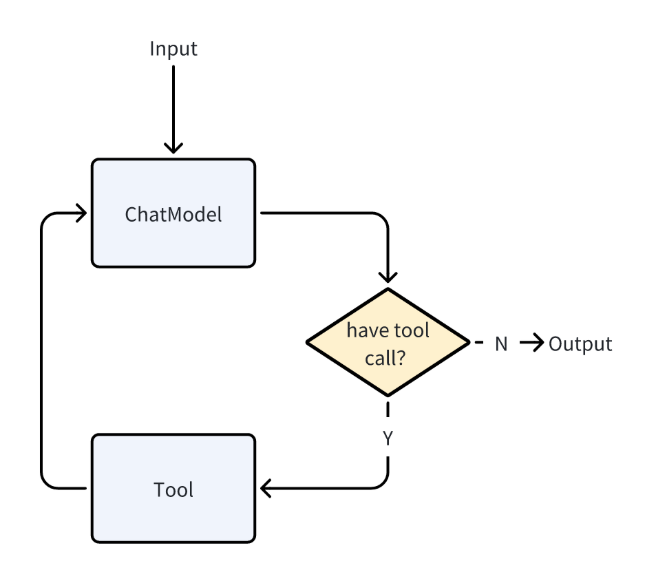
The core of the ReAct pattern is a closed loop of Reason → Act → Observe → Reason Again, which addresses the pain points of traditional agents that either act blindly or have a disconnect between reasoning and action.
Here are some possible practical scenarios:
Generating a market analysis report:
Reason-1: To assess the potential of a sector, information on policy support, industry growth rate, profitability of leading companies, and supply chain bottlenecks is needed.
Action-1: Call an API to get overall financial data for the industry.
Observe-1: Analyze the data.
Reason-2: Determine that the industry has high growth and policy endorsement, but rising upstream prices may squeeze downstream profits. Decide that further verification is needed.
Act-2: Call an API to get detailed data on supply and demand, industry research reports, and so on.
Observe-2: Analyze the data.
Reason-3: Integrate the conclusions to generate an analysis report with key data sources.
Using the ReAct pattern avoids information overload caused by collecting all the information at once. It focuses on core issues through gradual reasoning and uses data to verify thoughts rather than relying on intuition. The process is also explainable, improving the accuracy of the generated report.
IT fault operations and maintenance:
Reason-1: Identify common causes of failures, such as “CPU overload, insufficient memory, full disk, or service crash.” Basic monitoring data needs to be checked first.
Act-1: Call the “Monitoring System API” to query server metrics.
Observe-1: Analyze the server metrics.
Reason-2: Determine the main cause. For example, if CPU utilization is abnormal, investigate which processes have high CPU usage.
Act-2: Use a “Process Management Tool” to check the top processes for any abnormal services.
Observe-2: Discover that the logging service is abnormal, possibly due to “log file too large” or “configuration error.” Verify these conditions before planning the next step.
Reason-3: Check the logging service’s configuration and log file size.
Act-3: Execute a bash command.
Observe-4: Find that the log file is too large, and the configuration does not enable rotation or set a maximum log size.
Reason-4: Provide a feasible solution to the O&M engineer: clean up the logs, modify the configuration to enable rotation, and restart the logging service and application.
The ReAct pattern gradually narrows down the problem scope, avoiding blind operations. Each step is well-founded, making it easy for O&M engineers to perform secondary verification before implementing solutions, and providing a basis for subsequent reviews and preventative measures.
ChatModelAgent leverages the capabilities of LLMs for reasoning, understanding natural language, making decisions, generating responses, and interacting with tools, acting as the “thinking” part of an intelligent agent application.
Here is skeleton code for a ChatModelAgent with ReAct capabilities:
import "github.com/cloudwego/eino/adk"

// Create a ReAct ChatModelAgent with multiple tools
chatAgent := adk.NewChatModelAgent(ctx, &adk.ChatModelAgentConfig{
    Name: "intelligent_assistant",
    Description: "An intelligent assistant capable of using multiple tools to solve complex problems",
    Instruction: "You are a professional assistant who can use the tools provided to help users solve problems",
    Model: openaiModel,
    ToolsConfig: adk.ToolsConfig{
        Tools: []tool.BaseTool{
            searchTool,
            calculatorTool,
            weatherTool,
        },
    },
})
WorkflowAgents: The Sophisticated Pipeline
Eino ADK provides the WorkflowAgents pattern, designed to coordinate the execution flow of sub-agents. It manages the running of agents through predefined logic to produce a deterministic execution process, helping to achieve a predictable and controllable output.
You can arrange and combine the following patterns as needed:
SequentialAgent
ParallelAgent
LoopAgent
And combine them with ChatModelAgent to construct a complete workflow pipeline. Here are descriptions of each agent in detail:
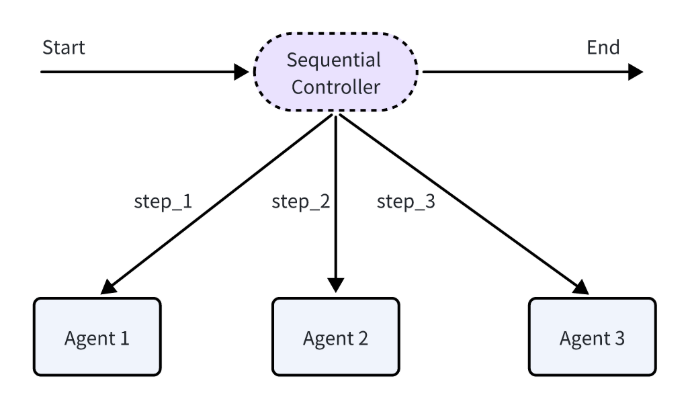
SequentialAgent: Executes the registered agents in the configuration in sequence once, and then ends. The operation follows these principles:
Linear execution: Strictly executes in the order of the SubAgents array.
Passing of run results: Each agent in the configuration can get the complete input of the SequentialAgent and the output of the preceding agent.
Support for early exit: If any sub-agent produces an exit/interrupt action, the entire Sequential process will be terminated immediately.
Possible practical scenarios include:
Data ETL: ExtractAgent (extracts order data from MySQL) → TransformAgent (cleans null values, formats dates) → LoadAgent (loads into a data warehouse)
CI/CD pipeline: CodeCloneAgent (pulls code from a code repository) → UnitTestAgent (runs unit tests, returns an error and analysis report when a test case fails) → CompileAgent (compiles the code) → DeployAgent (deploys to the target environment)
Skeleton code for a SequentialAgent:
import "github.com/cloudwego/eino/adk"

// Execute in sequence: create a research plan -> search for materials -> write a report
sequential := adk.NewSequentialAgent(ctx, &adk.SequentialAgentConfig{
    Name: "research_pipeline",
    SubAgents: []adk.Agent{
        planAgent,   // Create a research plan
        searchAgent, // Search for materials
        writeAgent,  // Write a report
    },
})
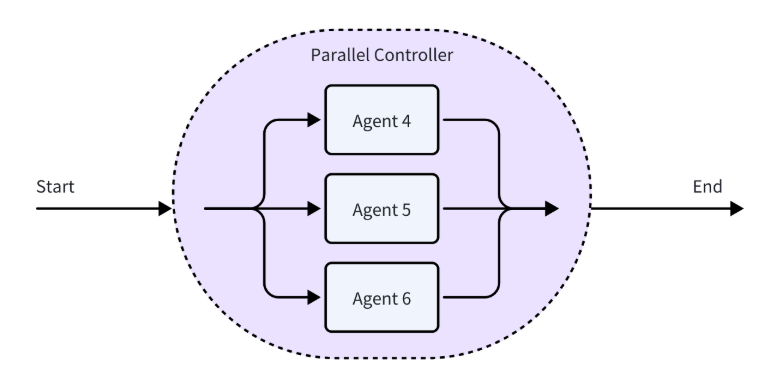
ParallelAgent: Executes the registered agents in the configuration concurrently, and ends after all agents have finished executing. The operation follows these principles:
Concurrent execution: All sub-agents start at the same time and execute in parallel in separate goroutines.
Shared input: All sub-agents receive the same initial input as when the ParallelAgent was called.
Waiting and result aggregation: Internally uses sync.WaitGroup to wait for all sub-agents to complete, collects the execution results of all sub-agents, and outputs them to the AsyncIterator in the order they are received.
Possible practical scenarios include:
Multi-source data collection: MySQLCollector (collects user table) + PostgreSQLCollector (collects order table) + MongoDBCollector (collects product reviews)
Multi-channel push: SocialPushAgent (pushes to social media account) + SMSPushAgent (sends SMS) + AppPushAgent (pushes to app)
Skeleton code for a ParallelAgent:
import "github.com/cloudwego/eino/adk"

// Concurrently execute sentiment analysis + keyword extraction + content summarization
parallel := adk.NewParallelAgent(ctx, &adk.ParallelAgentConfig{
    Name: "multi_analysis",
    SubAgents: []adk.Agent{
        sentimentAgent, // Sentiment analysis
        keywordAgent,   // Keyword extraction
        summaryAgent,   // Content summarization
    },
})
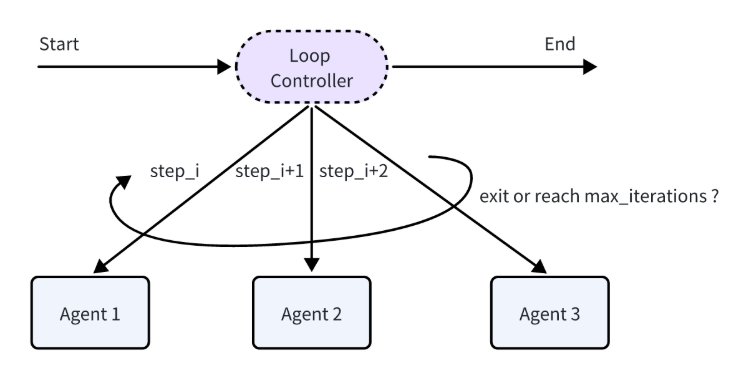
LoopAgent: Executes the registered agents in the configuration in sequence and loops multiple times. The operation follows these principles:
Loop execution: Repeatedly executes the SubAgents sequence, with each loop being a complete Sequential execution process.
Accumulation of run results: The results of each iteration are accumulated, and the input of subsequent iterations can access all historical information.
Conditional exit: Supports terminating the loop by outputting an event containing an ExitAction or reaching the maximum number of iterations. Configuring MaxIterations=0 means an infinite loop.
Possible practical scenarios include:
Data Synchronization: CheckUpdateAgent (checks for incremental changes in the source database) → IncrementalSyncAgent (synchronizes incremental data) → VerifySyncAgent (verifies consistency)
Pressure Testing: StartClientAgent (starts a test client) → SendRequestsAgent (sends requests) → CollectMetricsAgent (collects performance metrics)
Skeleton code for a LoopAgent:
import "github.com/cloudwego/eino/adk"

// Loop 5 times, with the sequence each time being: analyze the current state -> propose an improvement plan -> verify the improvement effect
loop := adk.NewLoopAgent(ctx, &adk.LoopAgentConfig{
    Name: "iterative_optimization",
    SubAgents: []adk.Agent{
        analyzeAgent,   // Analyze the current state
        improveAgent,   // Propose an improvement plan
        validateAgent,  // Verify the improvement effect
    },
    MaxIterations: 5,
})
Pre-built Multi-Agent Paradigms
Eino ADK provides three pre-built multi-agent paradigms:
The Supervisor pattern for centralized coordination
The Plan-Execute pattern for structured problem solving
The DeepAgents pattern for complex workflows that require multi-step, multi-role collaboration
Developers can use them out of the box without having to design collaboration logic from scratch. The following sections lay out the patterns along with skeleton code.
Supervisor Pattern
The Supervisor agent is a centralized multi-agent collaboration pattern, designed to provide a solution for the general scenario of centralized decision-making and distributed execution.
It consists of a Supervisor agent and multiple sub-agents, where:
The Supervisor agent is responsible for task allocation, summarizing the results after the sub-agents are completed, and making the next decision.
The sub-agents focus on executing specific tasks and automatically return control of the task to the Supervisor after completion.
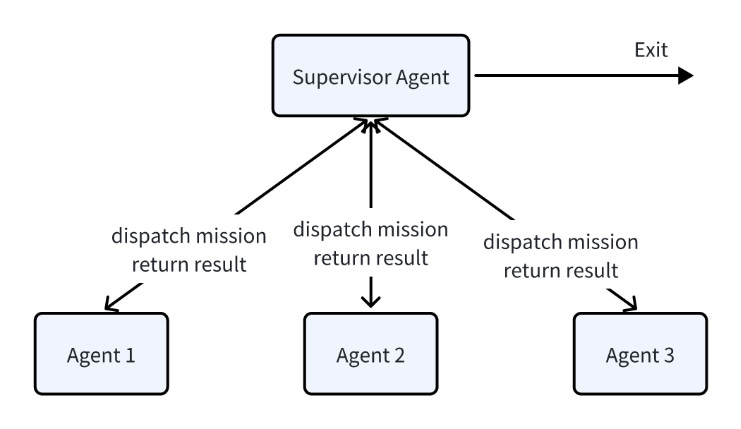
The Supervisor pattern has the following characteristics:
Centralized control: The Supervisor uniformly manages the sub-agents and can dynamically adjust task allocation based on the input and the execution results of the sub-agents.
Deterministic callback: After a sub-agent has finished executing, it will return the running result to the Supervisor agent, avoiding interruption of the collaboration process.
Loosely coupled extension: Sub-agents can be developed, tested, and replaced independently, which is useful for expansion and maintenance.
This hierarchical structure of the Supervisor pattern is suitable for scenarios that dynamically coordinate multiple specialized agents to complete complex tasks, such as:
Research project management: The Supervisor assigns research, experimentation, and report writing tasks to different sub-agents.
Customer service processes: The Supervisor assigns tasks to technical support, after-sales, and sales sub-agents, based on the type of user problem.
Skeleton code:
import "github.com/cloudwego/eino/adk/prebuilt/supervisor"

// Research project management: create a multi-agent in supervisor mode
// Contains three sub-agents: research, experimentation, and report
supervisor, err := supervisor.New(ctx, &supervisor.Config{
    SupervisorAgent: supervisorAgent,
    SubAgents: []adk.Agent{
        researchAgent,
        experimentationAgent,
        reportAgent,
    },
})
Plan-Execute-Replan Pattern
The Plan-Execute-Replan agent is a multi-agent collaboration pattern based on the “plan-execute-reflect” paradigm (refer to the 2023 paper Plan-and-Solve Prompting by Wang L. et al). Through the collaborative work of three core intelligent agents, it achieves structured planning of tasks, tool call execution, progress evaluation, and dynamic replanning:
Planner: Generates a structured initial task plan with detailed steps based on the user’s goals.
Executor: Executes the first step in the current plan.
Replanner: Evaluates the execution progress and decides whether to revise the plan and continue to have the Executor run it, or to end the task.
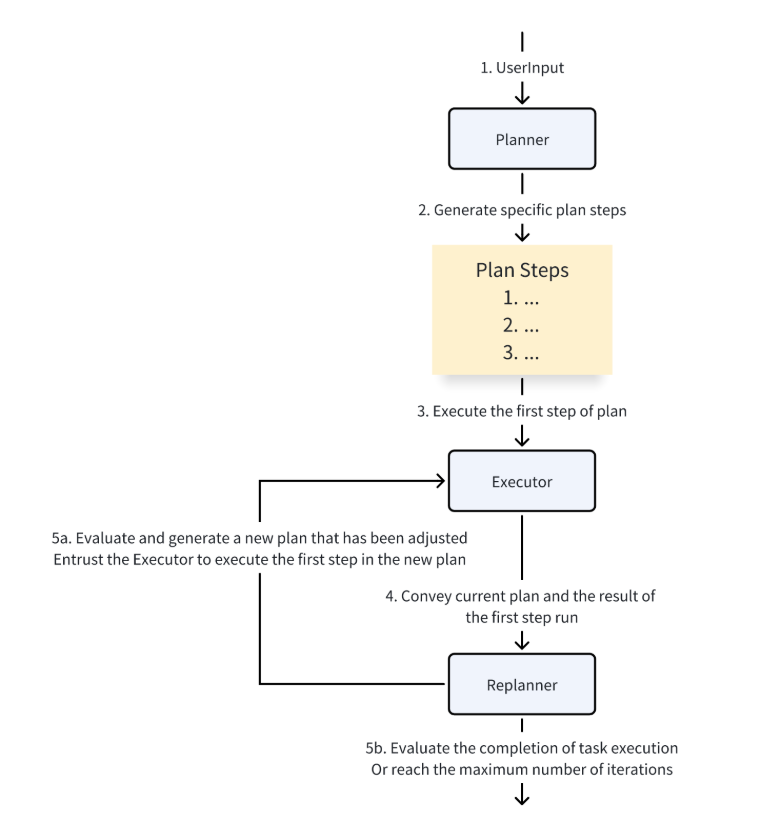
The Plan-Execute-Replan pattern has the following characteristics:
Clear hierarchical architecture: By breaking down the task into three stages –planning, execution, and reflection/replanning – a hierarchical cognitive process is formed, which embodies the closed-loop cognitive strategy of “think before you act, then adjust based on feedback.”
Dynamic iterative optimization: The Replanner determines in real time whether the task is complete or needs to be adjusted based on the execution results and current progress, and supports dynamic replanning. This mechanism effectively solves the bottleneck of traditional single-planning – where there is difficulty coping with environmental changes and task uncertainty – and improves the robustness and flexibility of the system.
Clear responsibilities and loose coupling: The Plan-Execute-Replan pattern consists of multiple intelligent agents working together, and supports independent development, testing, and replacement. The modular design is useful for expansion and maintenance and conforms to engineering best practices.
Good extensibility: It does not rely on a specific language model, tool, or agent, which is convenient for integrating diverse external resources to meet the needs of different application scenarios.
The “plan → execute → replan” closed-loop structure of the pattern is suitable for complex task scenarios that require multi-step reasoning, dynamic adjustment, and tool integration, such as:
Complex research analysis: Decompose research questions through planning, perform multiple rounds of data retrieval and calculation, and dynamically adjust research directions and hypotheses to improve the depth and accuracy of the analysis.
Automated workflow management: Decompose complex business processes into structured steps, combine them with a variety of tools (such as database queries, API calls, and compute services) to execute them step-by-step, and dynamically optimize the process based on execution results.
Multi-step problem-solving: Scenarios that require step-by-step reasoning and multi-tool collaboration, such as legal consultation, technical diagnosis, and strategy formulation, to ensure that each step of execution has feedback and adjustment.
Intelligent assistant task execution: Supports intelligent assistants to plan task steps based on user goals, call external tools to complete specific operations, and adjust subsequent plans based on replanning and thinking combined with user feedback, improving the completeness and accuracy of task completion.
Skeleton code:
import "github.com/cloudwego/eino/adk/prebuilt/planexecute"

// A research assistant in Plan-Execute mode
researchAssistant := planexecute.New(ctx, &planexecute.Config{
    Planner: adk.NewChatModelAgent(ctx, &adk.ChatModelAgentConfig{
        Name:        "research_planner",
        Instruction: "Create a detailed research plan, including literature research, data collection, analysis methods, etc.",
        Model:       gpt4Model,
    }),
    Executor: adk.NewChatModelAgent(ctx, &adk.ChatModelAgentConfig{
        Name: "research_executor",
        ToolsConfig: adk.ToolsConfig{
            Tools: []tool.BaseTool{
                scholarSearchTool,
                dataAnalysisTool,
                citationTool,
            },
        },
    }),
    Replanner: replannerAgent,
})
DeepAgents Pattern
DeepAgents is a multi-agent pattern unified under the coordination of a MainAgent. The MainAgent leverages a ChatModel with tool-calling capabilities to operate through a ReAct workflow:
It decomposes user goals into structured to-do items and records progress through WriteTodos.
It selects and invokes corresponding sub-agents to execute subtasks through the unified TaskTool interface; main/sub-agent contexts are isolated to prevent intermediate steps from contaminating the main workflow.
It aggregates results returned by various sub-agents; when necessary, it calls WriteTodos again to update progress or perform replanning until completion.
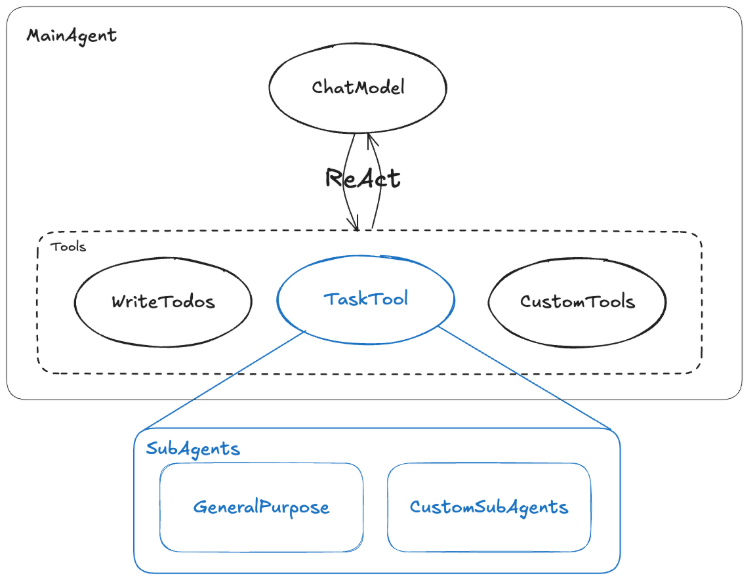
The characteristics of the DeepAgents pattern include:
Enhanced task decomposition and progress management: WriteTodos creates clear subtasks and milestones, making complex goals decomposable and trackable.
More robust context isolation: Sub-agents execute in “clean” contexts while the main agent only aggregates results, reducing interference from redundant reasoning chains and tool call traces on the main workflow.
Unified delegation interface with easy extensibility: TaskTool abstracts all sub-agents and tool capabilities into a unified calling surface, facilitating the addition or replacement of specialized sub-agents.
Flexible closed-loop of planning and execution: Planning functions as a tool that can be called on demand; for simple tasks, unnecessary planning can be skipped, reducing LLM call costs and time consumption.
Boundaries and trade-offs: Over-decomposition increases call frequency and costs; it places higher demands on subtask division and prompt optimization, requiring models to possess stable tool-calling and planning capabilities.
The core value of DeepAgent lies in automatically handling complex workflows that require multi-step, multi-role collaboration. It’s not just an executor of single functions but a “project manager” with deep thinking, planning, and dynamic adjustment capabilities.
Suitable application scenarios include:
Complex business processes with multi-role collaboration: Centered around R&D, testing, release, legal, and operations roles, with centralized delegation of subtasks and unified aggregation; each stage sets gateways and rollback strategies, with visible progress and retry capabilities.
Phased management of long workflows: Planning decomposes steps such as data cleaning, validation, lineage analysis, and quality inspection; sub-agents run in isolated contexts; when exceptions occur, only relevant stages are re-run, with unified reconciliation and aggregation of outputs.
Execution environments requiring strict context isolation: A unified interface collects materials and requests, with TaskTool routing subtasks such as legal, risk control, and finance separately; boundaries between subtasks are clearly defined and mutually invisible, with auditable progress and traceability, and failures can be retried without affecting other stages.
Skeleton code:
import "github.com/cloudwego/eino/adk/prebuilt/deep"

agent, err := deep.New(ctx, &deep.Config{
    Name:       "deep-agent",
    ChatModel:  gpt4Model,
    SubAgents: []adk.Agent{
        LegalAgent,
        RiskControlAgent,
        FinanceAgent,
    },
    MaxIteration: 100,
})
Example: Project Manager Intelligent Agent
Now you have covered the basics, it’s time to create an agent. Install the latest version of Eino using the following command:
go get github.com/cloudwego/eino@latestIn this example, you’ll see how to build a Project Manager intelligent agent for a variety of scenarios. It uses the Supervisor pattern, and the functions of each agent are as follows:
ResearchAgent: Responsible for researching and generating feasible solutions, supporting interruption and receiving additional context information from users to improve the accuracy of research plan generation.
CodeAgent: Uses knowledge base tools to recall relevant knowledge as a reference to generate high-quality code.
ReviewAgent: Uses a sequential workflow to orchestrate three steps: problem analysis, evaluation generation, and evaluation verification to review research results/coding results and provide reasonable evaluations so project managers can make decisions.
ProjectManagerAgent: Routes and coordinates multiple sub-intelligent agents responsible for different dimensions of work based on dynamic user input.
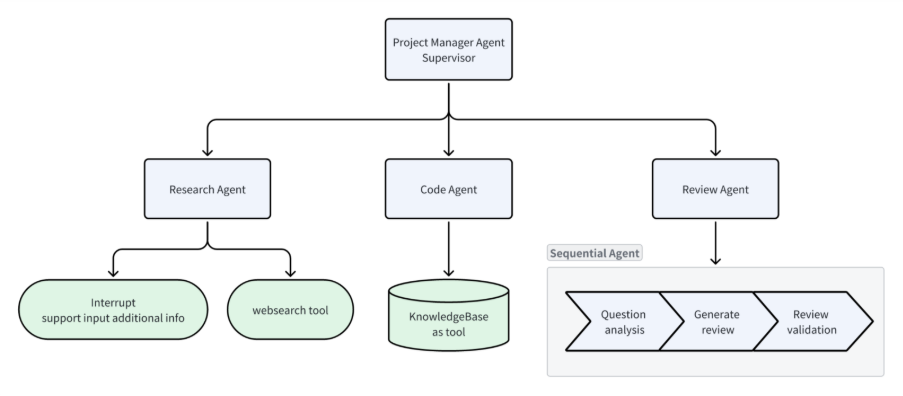
The design of this example covers most of the concepts introduced in the article.
The core code is as follows. The complete code can be found in the source code provided in the eino-examples project:
func main() {
    ctx := context.Background()

    // Init chat model for agents
    tcm, err := openai.NewChatModel(ctx, &openai.ChatModelConfig{
        APIKey:  os.Getenv("OPENAI_API_KEY"),
        Model:   os.Getenv("OPENAI_MODEL"),
        BaseURL: os.Getenv("OPENAI_BASE_URL"),
        ByAzure: func() bool {
            return os.Getenv("OPENAI_BY_AZURE") == "true"
        }(),
    })
    if err != nil {
        log.Fatal(err)
    }

    // Init research agent
    researchAgent, err := agents.NewResearchAgent(ctx, tcm)
    if err != nil {
        log.Fatal(err)
    }

    // Init code agent
    codeAgent, err := agents.NewCodeAgent(ctx, tcm)
    if err != nil {
        log.Fatal(err)
    }

    // Init technical agent
    reviewAgent, err := agents.NewReviewAgent(ctx, tcm)
    if err != nil {
        log.Fatal(err)
    }

    // Init project manager agent
    s, err := agents.NewProjectManagerAgent(ctx, tcm)
    if err != nil {
        log.Fatal(err)
    }

    // Combine agents into ADK supervisor pattern
    // Supervisor: project manager
    // Sub-agents: researcher / coder / reviewer
    supervisorAgent, err := supervisor.New(ctx, &supervisor.Config{
        Supervisor: s,
        SubAgents:  []adk.Agent{researchAgent, codeAgent, reviewAgent},
    })
    if err != nil {
        log.Fatal(err)
    }

    // Init Agent runner
    runner := adk.NewRunner(ctx, adk.RunnerConfig{
        Agent:           supervisorAgent,
        EnableStreaming: true,               // enable stream output
        CheckPointStore: newInMemoryStore(),  // enable checkpoint for interrupt & resume
    })

    // Replace it with your own query
    query := "please generate a simple ai chat project with python."
    checkpointID := "1"

    // Start runner with a new checkpoint id
    iter := runner.Query(ctx, query, adk.WithCheckPointID(checkpointID))

    interrupted := false
    for {
        event, ok := iter.Next()
        if !ok {
            break
        }

        if event.Err != nil {
            log.Fatal(event.Err)
        }

        if event.Action != nil && event.Action.Interrupted != nil {
            interrupted = true
        }

        prints.Event(event)
    }

    if !interrupted {
        return
    }

    // interrupt and ask for additional user context
    scanner := bufio.NewScanner(os.Stdin)
    fmt.Print("\ninput additional context for web search: ")
    scanner.Scan()
    fmt.Println()
    nInput := scanner.Text()

    // Resume by checkpoint id, with additional user context injection
    iter, err = runner.Resume(
        ctx,
        checkpointID,
        adk.WithToolOptions([]tool.Option{agents.WithNewInput(nInput)}),
    )
    if err != nil {
        log.Fatal(err)
    }

    for {
        event, ok := iter.Next()
        if !ok {
            break
        }

        if event.Err != nil {
            log.Fatal(event.Err)
        }

        prints.Event(event)
    }
}
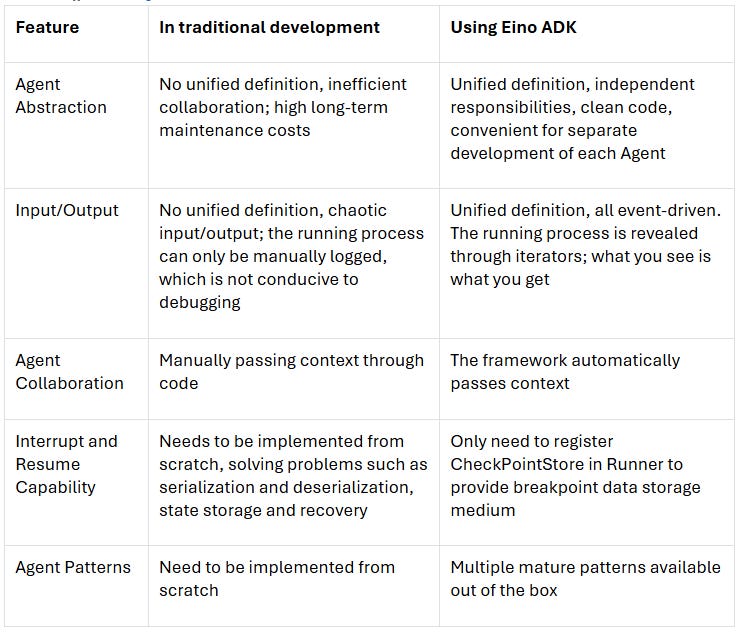
If you stop and think about how you would build this example with regular tools, the advantages of ADK will become apparent:
Useful Resources
Find out more about Eino using the following links:
If you have questions about Eino, head to GitHub to fill out an issue.
If you want to get in touch with the Eino Team Lead, Li Pandeng, reach out to lipandeng [at] bytedance [dot] com.
 | A guest post by
|