

Coroutines
The complete Chapter 15: Coroutines from Kotlin for Java Developers by José Dimas Luján Castillo and Ron Veen (Packt, 2025)


In this chapter, we will explore one of Kotlin’s most powerful and transformative features – coroutines. Designed to simplify and enhance asynchronous programming, coroutines allow developers to write non-blocking, concurrent code with ease and clarity. By offering a structured and intuitive approach to handling tasks such as API calls, database operations, and UI updates, coroutines have become a cornerstone for modern Kotlin development.
Unlike traditional approaches to asynchronous programming, such as threads and callbacks, coroutines eliminate complexity by providing a way to write asynchronous code that looks and behaves like synchronous code. This chapter introduces you to the fundamentals of coroutines, teaching you how to avoid issues with callbacks and enabling you to manage concurrency gracefully and efficiently.
Kotlin’s coroutines framework is built on top of lightweight threads, providing developers with the tools to execute tasks in parallel, handle timeouts and cancellations, and switch between different execution contexts. Throughout this chapter, we will uncover how coroutines work, why they are an improvement over traditional concurrency models, and how to leverage them to build robust and responsive applications.
We will start by understanding what coroutines are and how they differ from threads and other concurrency mechanisms. Next, we will dive into the implementation of coroutines, learning about coroutine builders such as launch and async, as well as the importance of suspending functions in asynchronous workflows. We will then explore strategies for managing timeouts and cancellations, ensuring our applications remain efficient and responsive under various conditions. Finally, we will tackle the advanced concepts of context and scope, which are essential for organizing and managing coroutine life cycles effectively.
By the end of this chapter, you will have a comprehensive understanding of Kotlin coroutines, enabling you to write clean, maintainable, and high-performing asynchronous code. Whether you’re developing Android applications, server-side services, or any system requiring concurrent operations, mastering coroutines will empower you to tackle complex challenges with confidence and precision.
We’re going to cover the following topics:
What is a coroutine?
Coroutine implementation
Timeouts and cancellations
Contexts and scope
Technical requirements
You can use any text editor or Integrated Development Environment (IDE) of your choice with the Java language. We recommend IntelliJ IDEA Community Edition (CE). This tool already comes with everything you need to work with both Java and Kotlin. The software requirements for this chapter, with required versions, are as follows:
Java JDK 17 or higher
IntelliJ IDEA CE
Kotlin 1.x or 2.x
The code used in the chapters can be found in the book’s accompanying GitHub repository: https://github.com/PacktPublishing/Kotlin-for-Java-Developers.
What is a coroutine?
To simplify what a coroutine is, let’s first look at the official definition: “A coroutine is an instance of a suspendable computation.” While technically accurate, it may seem too abstract. Instead, let’s break it down with a practical and relatable analogy.
Imagine you are dining at a restaurant. A waiter comes to your table, takes your food order, and heads to the kitchen to pass the order on to the chefs. Now, imagine the waiter stays in the kitchen, doing nothing but waiting for your food to be prepared. This would be inefficient, as the waiter could be serving drinks, attending to other tables, or bringing bread to your table while the food is being cooked.
A smarter approach is for the waiter to leave the instructions with the kitchen staff and return to attend to other customers or tasks. Once your food is ready, the kitchen would alert the waiter, who would promptly bring the dishes to your table.
This efficiency is exactly how coroutines operate. In programming, there’s a “main thread” (like the waiter), which handles primary tasks (like serving the diners in our analogy). However, certain tasks (such as cooking the food) can take an unknown amount of time. These tasks are better handled asynchronously, without blocking the main thread.
The restaurant analogy
To make the concept of coroutines easier to grasp, let’s stick with the restaurant analogy. This comparison helps illustrate how asynchronous tasks and concurrency work in Kotlin using coroutines:
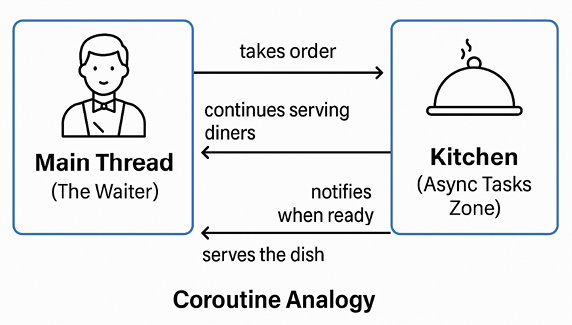
Let’s try to understand this analogy:
Main thread as the waiter: The main thread is responsible for visible and interactive tasks (like serving diners). It shouldn’t be blocked (or stuck in the kitchen).
Asynchronous tasks as the kitchen: Some operations, like fetching data from the internet or reading from a database, are similar to cooking food in the kitchen. These tasks can take time and don’t need the waiter (the main thread) to stand idle while waiting for them to finish.
Coroutines as the waiter’s delegation: The waiter can delegate tasks such as food preparation to the kitchen while continuing to handle other responsibilities (serving drinks, taking new orders). Similarly, coroutines allow you to “pause” tasks and resume them later without stopping the main thread.
Concurrent coroutines for multiple tasks: Just as a waiter can manage multiple orders at once, you can create multiple coroutines to handle different tasks simultaneously. For instance, one chef can prepare appetizers, another can handle main courses, and yet another can prepare desserts – all while the waiter continues serving diners.
In programming terms
Kotlin simplifies asynchronous programming, but it doesn’t include heavy low-level APIs in its standard library. Instead, it provides just enough tools for libraries, such as kotlinx.coroutines, to build powerful coroutine-based utilities. Unlike some other languages, Kotlin doesn’t treat async and await as keywords or include them directly in the language. Instead, it uses suspending functions, which make asynchronous code safer and easier to use compared to traditional approaches such as futures or promises.
To better understand how coroutines work, let’s map their behavior to real-world and programming concepts. This helps clarify how Kotlin approaches asynchronous programming in a more intuitive way:
Main thread: The core execution thread that interacts with users (like serving diners).
Coroutine: A lightweight task that runs asynchronously and can be paused and resumed without blocking the main thread.
Suspension: Like the waiter leaving instructions in the kitchen, a coroutine can “pause” its execution, allowing the main thread to continue working until the task is complete.
The kotlinx.coroutines library, developed by JetBrains, is a feature-rich library that provides high-level tools for working with coroutines. It includes useful functions such as launch and async, which simplify working with background tasks.
Explanation of coroutines for a Java programmer
It’s important to know that Java does not have coroutines. However, there are many ways we can achieve the results that coroutines achieve, and it is very likely that those of you who know Java might know some of these ways.
While there are projects such as Project Loom and Quasar that attempt to bring coroutine-like behavior to Java, they require third-party dependencies and are not yet widely adopted in the Java ecosystem.
Java thread handling was enhanced with virtual threads in version 21. They are a more lightweight threading model. Yet, virtual threads and coroutines serve different purposes. Virtual threads are primarily used for high-throughput, I/O-bound server applications based on a thread-per-request model. Coroutines, on the other hand, are typically used for various asynchronous tasks.
Note that it is perfectly possible for a coroutine to use a virtual thread to execute its tasks, especially if these tasks include blocking I/O operations.
In this section, we explored the fundamental concept of coroutines, learning how they provide a powerful and efficient alternative to traditional asynchronous programming models such as threads, futures, and promises. Using the analogy of a waiter in a restaurant, we visualized how coroutines delegate long-running tasks to the background while keeping the main thread free to handle interactive or essential tasks. Key characteristics of coroutines, such as their non-blocking nature, ease of readability, and lightweight execution, were highlighted as significant advantages over Java’s concurrency options. For Java developers, the comparison to traditional tools such as threads and futures underlined the simplicity and efficiency that coroutines bring to the table.
In the next section, we will dive deeper into the practical aspects of working with coroutines. You’ll learn how to create and manage coroutines using coroutine builders and suspending functions, setting the foundation for writing clean and effective asynchronous code in Kotlin. Let’s begin our hands-on journey into coroutine implementation!
Coroutine implementation
Now let’s see how to implement coroutines in a Kotlin project. For this, we’ll start from scratch. First, we’ll do something very simple; we can consider it the “Hello World“ of coroutines. Then we’ll increase the difficulty of the example and show other features.
We will start by adding the possibility of using coroutines in our project, and for that, we will add the dependency.
One thing to note is that using kotlinx.coroutines has become a convention in the Kotlin community, making it easier to collaborate and understand code.
We don’t recommend trying to memorize the versions, since over time, these change, and they change faster than you can imagine. It is more important to know what the official kotlinx.coroutines repository is. GitHub is a reliable source to obtain information about the latest versions and news: https://github.com/Kotlin/kotlinx.coroutines.
In general terms, we can say that we need to add the coroutines dependency. We can find it in our build.gradle.kts file, and the configuration would be something like this:
dependencies {
testImplementation(kotlin("test"))
implementation("org.jetbrains.kotlinx:kotlinx-coroutines-core:1.8.0")
}
For coroutines, we add the one reference to kotlinx 1.8.0, which is enough for what we will do in this chapter. Now, in our first contact with coroutines, we are going to write Hello World. This will be our starting point for this entire chapter. This is the code:
import kotlinx.coroutines.delay
import kotlinx.coroutines.launch
import kotlinx.coroutines.runBlocking
fun main() = runBlocking {
    launch {
        delay(1000L)
        println("Kotlin World! ")
    }
    println("Hello")
}
The imports come from the kotlinx.coroutines package, which contains the main tools for working with coroutines in Kotlin:
delay: A function that suspends the execution of a coroutine for a specific time (in milliseconds) without blocking the thread.launch: A function that starts a new coroutine in parallel with the existing execution.runBlocking: A function that runs a blocking coroutine, useful for simple examples or tests where we want to block the main thread until the inner coroutines finish.
The imports should be familiar. The first part that is noticeably different from basic “Hello World“ code is the following:
fun main() = runBlocking {The runBlocking instruction is used here to allow main to run as a coroutine. It blocks the main thread until all coroutines within its block finish executing.
This ensures that the program does not terminate before the coroutines finish.
Let’s look at the launch instruction:
launch {
    delay(1000L)
    println("Kotlin World!")
}
launch creates a new coroutine. This coroutine runs concurrently with the rest of the code inside runBlocking.
Inside this coroutine, we have delay(1000L), which suspends the coroutine for 1 second (1,000 milliseconds) without blocking the thread. This means that the main thread is free to perform other tasks in the meantime, and after one second, it prints "Kotlin World!".
Finally, we have the last instruction:
println("Hello")Since the coroutine does not block the thread, this message is printed before the coroutine finishes its task.
Summarizing the flow, we can describe it as follows:
The main function is executed and enters the
runBlockingblock.Inside
runBlocking, the following occurs:A coroutine is launched with
launch.Execution continues without waiting for the coroutine to finish, so
println("Hello")is executed immediately.
In the meantime, the coroutine executes
delay(1000L), which suspends the coroutine for one second.After the delay, it prints
"Kotlin World!".The program waits inside
runBlockinguntil all coroutines inside its block finish. Only then doesrunBlockingcomplete and the program terminates.
After executing the code, we see the following as a result:
Hello
Kotlin World!
The reason we started with Hello World is simple – we are studying the simplest possible case to show how coroutines allow concurrent tasks (such as waiting a second) to be expressed without blocking the entire scope of execution. In this example, runBlocking blocks the main thread until all coroutines inside complete, but the coroutine launched with launch runs concurrently within that scope.
Compared to a traditional threading approach, this is more efficient and easier to read.
We introduced the concepts of delay and launch in a simple context. Now we will look at another example. We will simulate a restaurant scenario to demonstrate how coroutines handle asynchronous tasks.
We want to demonstrate how to perform multiple tasks simultaneously
We are going to show how not to block the main thread while waiting for long-running tasks. We will illustrate coordination between different asynchronous operations, something similar to what we mentioned about the waiter and the restaurant. This is the new code:
import kotlinx.coroutines.*
fun main() = runBlocking {
    println("Taking order...")
    // Coroutine 1: Preparing food in the kitchen
    val food = async { prepareFood() }
    // Coroutine 2: Serving drinks
    serveDrinks()
    // Wait for food to be ready and serve it
    println("Food is ready: ${food.await()}")
}
suspend fun prepareFood(): String {
    delay(3000) // Simulate food preparation
    return "Delicious meal"
}
fun serveDrinks() {
    println("Serving drinks to the table...")
}
The runBlocking block represents the main thread where primary actions (such as interacting with diners) occur. As mentioned before, the runBlocking instruction is a function that runs a block of code as a blocking coroutine. This means that the program will not end until all the code inside this block finishes. In this example, it represents the main thread, which acts as the waiter handling multiple tasks.
println("Taking order...")The preceding line of code is printed immediately on the main thread (representing the waiter).
val food = async { prepareFood() }async launches a new coroutine to execute the prepareFood() function concurrently.
async is a function that returns a Deferred object, which is like a “future” in Java. This object can be awaited or revisited later to get the results of the operation.
In this case, it represents the cook who starts preparing the food in the background.
Let us look at the prepareFood function:
suspend fun prepareFood(): String {
    delay(3000) // Simulate food preparation
    return "Delicious meal"
}
The prepareFood function is a suspended function, meaning that it can pause its execution and later resume exactly where it left off, without blocking the underlying thread while it is waiting. However, a suspend function can only be called from another suspend function or within a coroutine. It is also important to note that while the thread is not blocked, the coroutine that invokes prepareFood will remain suspended until the function resumes.
delay(3000) simulates a meal preparation time of three seconds. During this time, the coroutine is suspended, allowing the main thread to do other tasks.
After the delay, it returns Delicious meal.
While the food is being prepared (the async coroutine is suspended), the main thread continues to execute this function:
serveDrinks()It prints the message Serving drinks to the table....
Here, the waiter (main thread) serves drinks while waiting for the cook to finish the food:
println("Food is ready: ${food.await()}")food.await() pauses execution at this point until the prepareFood() coroutine finishes and returns its result.
Once prepareFood() returns Delicious meal, the main thread prints the following:
Food is ready: Delicious mealThis is how the flow goes:
runBlockingstarts the main block.The waiter takes the order and starts serving the drinks.
Meanwhile, the cook (coroutine) prepares the food in the background.
After three seconds, the food is ready and the waiter serves it.
Returning to our analogy, we’ve already seen the following:
Waiter: This is the main thread that organizes tasks. It can serve drinks and handle other orders without getting stuck waiting for the food to be ready.Cook: This is a coroutine that works independently in the background, preparing the food.asyncandawait:asyncstarts the cook’s work andawaitmakes sure the waiter waits for the result before serving the food.delay: This simulates the time it takes the cook to prepare the food.
This is what we see after running the program:
Taking order...
Serving drinks to the table...
Food is ready: Delicious meal
The main goal of this exercise was to demonstrate how coroutines allow you to do several things “at the same time” efficiently, just like a good waiter in a restaurant.
We are going to show another example that simulates loading book data from an API using coroutines in Kotlin. The repository (BookRepository) has a suspended function that simulates a two-second delay before returning the book data. In the BookScreen class, withContext(Dispatchers.IO) is used to execute the task in a context suitable for I/O operations, displaying success or error messages depending on the result. This demonstrates how to handle asynchronous tasks in an efficient and readable way. But we will build it in parts.
import kotlinx.coroutines.*
// Simulate a repository that fetches book data
class BookRepository {
    // Simulate an API call to fetch a book
    suspend fun fetchBookFromApi(bookId: String): Book {
        delay(2000) // Simulate network response time
        return Book(bookId, "Clean Code", "Robert C. Martin")
    }
}
BookRepository has a suspend function, fetchBookFromApi, which simulates calling an API to get the data for a book.
It uses delay(2000) to represent a two-second network delay, and then returns a Book object as the result.
We add this code, which defines the class that the fetchBookFromApi function returns:
data class Book(
    val id: String,
    val title: String,
    val author: String
)
Book is a data class that represents information about a book, with properties such as id, title, and author.
class BookScreen {
    private val repository = BookRepository()
    fun loadBookData() = runBlocking {
    try {
        println(" Loading book information...")
        // Send the request in a coroutine
        val book = withContext(Dispatchers.IO) {
            repository.fetchBookFromApi("9780132350884")
}
BookScreen defines the loadBookData method, which uses runBlocking to handle loading book data within a coroutine.
The loadBookData method uses withContext(Dispatchers.IO) to perform the book-fetching task in a context optimized for I/O operations.
Finally, we define main, which will allow us to execute the code:
fun main() {
    val screen = BookScreen()
    screen.loadBookData()
}
In the main function, you simply create an instance of BookScreen and call the loadBookData method to start the process.
Summarizing the program flow, this would be as follows:
It prints “
Loading book information...“It waits two seconds, simulating the API response.
If everything goes well, it prints
"Book loaded: Clean Code by Robert C. Martin".If an error occurs, it prints
"Error loading book information: ..."
Let’s take a closer look at what’s happening in this exercise. We’ve successfully used runBlocking and withContext to run the task asynchronously and on a separate thread (Dispatchers.IO), which is ideal for I/O tasks such as API calls.
This approach is ideal for I/O tasks such as API calls because it allows us to perform these operations without blocking the main thread.
By offloading the work to a different dispatcher, we ensure that time-consuming operations (such as reading from a database, writing to a file, or calling an external API) don’t freeze the UI or other critical processes. In Kotlin coroutines, Dispatchers.IO is specifically optimized for these types of tasks, giving us efficient and responsive code even when dealing with slow or unpredictable external systems.
We have included a try-catch block to catch possible exceptions that may occur during the API call, which is a good practice to make your code more robust.
Simulating API response time with a delay is useful to understand the behavior of coroutines in real-world scenarios.
In this section, we introduced the foundational ideas behind coroutines in Kotlin, focusing on how they enable writing asynchronous, non-blocking code that remains readable and efficient. We illustrated real-world analogies and scenarios to highlight how coroutines support structured concurrency and safe context switching, making them a powerful tool for managing concurrent tasks in modern applications.
It’s important to clarify when to use these different coroutine builders:
runBlockingis typically used to bridge blocking and non-blocking code, for example, in tests or themainfunction of a small program. It blocks the current thread until its coroutine body finishes executing.In contrast, using coroutine builders such as
launchorasyncwithin an existing coroutine scope, combined with context switching (withContext), lets you run asynchronous code without blocking any thread, ensuring better performance and responsiveness.
It is important to note, however, that coroutines are not magical. If you call blocking operations inside a suspend function – for example, using Thread.sleep() or synchronous I/O calls such as JDBC – you will still block the underlying thread. To fully benefit from coroutines, blocking calls should be replaced with non-blocking equivalents whenever possible.
So, while runBlocking is useful in specific entry points, using structured concurrency with launch, async, and withContext is preferred in production code to handle tasks concurrently and safely without halting your program’s execution.
Now that we have a solid understanding of how to implement and use coroutines effectively, the next section will introduce timeouts and cancellations. You’ll learn how to gracefully handle scenarios where tasks take too long or need to be interrupted, ensuring your applications remain responsive and efficient under various conditions. Let’s continue exploring how Kotlin coroutines can simplify even the most complex asynchronous workflows!
Timeouts and cancellations
Now we will see two important elements that are good to know about in coroutines: timeouts and cancellations. Timeouts are time limits that you set for an operation. If the operation takes longer than the specified time, it is automatically cancelled.
A simple way to describe them using examples of daily activities would be as follows:
Ordering a pizza and getting the notice: “If it doesn’t arrive in 30 minutes, we cancel the order and refund you”.
When an ATM cancels the operation if we don’t respond within a certain time.
Cancellations, as their name suggests, allow us to stop a coroutine in the middle of its execution. Let’s look at a couple of examples:
Canceling a download in progress.
Canceling a bank transfer before it is completed.
Thinking of timeouts and cancellations as elements that we can use, we could easily give some situations where we could use them:
API calls that should not take too long.
File downloads that can be cancelled.
Database operations with a time limit.
Background processes that can be cancelled by the user.
Taking our previous example of books as a basis, we are now going to modify it to have both cancellation and timeouts.
The definitions of BookRepository and Book remain the same; we just add more time to Delay. Before, we had 2000, but we will change the value to 3000. We increased the time period to later; we set a time limit of two seconds and allowed three seconds to execute it (the timeout):
class BookRepository {
    // Simulates an API call to get a book
    suspend fun fetchBookFromApi(bookId: String): Book {
        delay(3000) // Simulates network response time
        return Book(bookId, "Clean Code", "Robert C. Martin")
    }
}
data class Book(
    val id: String,
    val title: String,
    val author: String
)
Now we will change launch to make it look like this:
val job = launch {
    try {
        println(" Loading book information...")
        // Set a timeout for the operation
        val book = withTimeout(2000) { // 2 second timeout
            repository.fetchBookFromApi("9780132350884")
        }
        println(" Book loaded: ${book.title} by ${book.author}")
    } catch (e: TimeoutCancellationException) {
        println(" Timeout exceeded when loading book.")
    } catch (e: Exception) {
        println(" Error loading book information: ${e.message}")
    }
}
We set a time limit of 2,000 milliseconds to complete the fetchBookFromApi operation. If the task does not finish within this time, TimeoutCancellationException is thrown. This mechanism is essential in applications where it is critical to avoid long blockages and ensure fast responses.
In this statement, we can see that the approach uses job, as declared with launch, to handle the execution of the coroutine:
val job = launch {This allows the job to be explicitly cancelled if necessary, providing flexibility to stop execution in specific situations. For example, the job could be cancelled with a call to job.cancelAndJoin() if the task is detected to be no longer relevant or if an external event occurs.
Exception handling is a key part of this approach:
} catch (e: TimeoutCancellationException) {
println(" Timeout exceeded when loading book.")
These last lines demonstrate how to handle scenarios where the time limit is exceeded, ensuring that the system can respond appropriately without crashing. Other exceptions are also handled to catch generic errors during execution.
While this approach is powerful, it adds complexity to the code. It requires explicitly handling both the job and exceptions, which may be unnecessary for simple tasks. However, in cases where strict time limits or precise cancellations are needed, this structure proves invaluable.
Outside of loadBookData, we will also modify the code in the following way:
// Change: Cancel the job after 4 seconds
delay(4000)
println(" Canceling the loading of the book...")
job.cancelAndJoin() // Cancel the job and wait for it to finish
println("Task cancelled.")
Notice that we have introduced a delay of 4,000 milliseconds and manual cancellation. Also notice that we use a job to cancel the task explicitly with job.cancelAndJoin().
The cancellation and timeout scenario introduces a more controlled approach to handling asynchronous tasks in Kotlin. Using launch and withTimeout, a time limit is set for the execution of an operation.
This ensures that the task does not exceed the time we decide, throwing an exception (TimeoutCancellationException) if the time runs out. Also, by encapsulating the logic in a job, the task can be cancelled explicitly when necessary, optimizing resources and allowing better management of multiple concurrent tasks.
This example we developed includes robust exception handling to differentiate between a timeout and other errors. In summary, this model is ideal for applications where time limits and cancellation of irrelevant or delayed tasks are required, although it adds a bit more complexity to the code.
This section emphasized the importance of timeouts and cancellations in effective coroutine management. By enforcing time limits and enabling controlled interruption of tasks, Kotlin coroutines provide mechanisms to keep applications responsive and resilient, especially when dealing with potentially long-running operations.
We also introduced the concept of cancellations, allowing tasks to be stopped explicitly when they are no longer needed. By leveraging the job object, we illustrated how to manage and cancel ongoing tasks using job.cancelAndJoin(), ensuring efficient resource management. Additionally, we incorporated robust exception handling to distinguish between timeout-specific issues (TimeoutCancellationException) and other errors, adding resilience to our code.
By combining these techniques, we showed how to handle asynchronous tasks in a controlled and efficient manner, enabling developers to create responsive applications that gracefully handle delays and interruptions. This approach is particularly useful in scenarios involving API calls, file downloads, or user-cancelled operations, providing flexibility and reliability.
Next, we’ll explore contexts and scopes, diving deeper into how coroutines manage their execution environments and life cycle. You’ll learn about coroutine dispatchers, structured concurrency, and how to properly manage coroutine life cycles to maintain clean, predictable, and efficient code. Let’s continue building our understanding of Kotlin coroutines with these advanced concepts!
Contexts and scope
Context and scope are fundamental concepts in the world of Kotlin coroutines and play a crucial role in managing their life cycle and behavior.
A context in Kotlin coroutines is like a container that groups key information about how and where a coroutine will run. This context includes the following:
Dispatcher: Defines which thread or thread group the coroutine will run on, as follows:
Dispatchers.IOfor I/O operations (such as working with files or network calls).Dispatchers.Mainfor updating the UI.
Job: Represents the specific task the coroutine performs. It also allows you to cancel it or monitor its progress.
Other attributes: Can include things such as the following:
CoroutineName: A useful identifier to distinguish coroutines.NonCancellable: Indicates that the coroutine should not be cancelled, even if its parent or associated scope is.
In addition, you can put custom elements into the coroutine context, such as an Mapped Diagnostic Context (MDC) for logging. It is also important to remember that thread-local variables are not effective with coroutines, since a coroutine may resume on a different thread. If you need thread-local-like behavior, you should use ThreadContextElement to propagate context across suspensions.
In short, a coroutine’s context sets up its execution environment: it defines where it runs, how it interacts with other processes, and what rules it should follow while working. It’s like giving the coroutine a roadmap and tools to get it to perform its task correctly.
The code for BookRepository and Book remains the same; we don’t have to make any changes.
The changes start with the BookScreen code. We add the scope as follows:
class BookScreen {
    private val repository = BookRepository()
    private val scope = CoroutineScope(Dispatchers.Main + Job())
CoroutineScope is used, which automatically encapsulates the context and the associated job. With this change, instead of the previously temporary scope used with runBlocking, now there is a permanent scope with CoroutineScope(Dispatchers.Main + Job()).
This makes it easier to manage related tasks, allowing all coroutines associated with the scope to be cancelled with a single call (scope.cancel()).
We need better organization for larger applications or those with multiple coroutines.
Let’s make some changes in the structure:
fun loadBookDetails(bookId: String) {
    scope.launch {
    withContext(Dispatchers.IO) {
        // code here
        }
    }
}
We notice with these changes that a specific scope is defined at the class level and dispatchers are explicitly specified. In addition, we are now handling specific execution contexts, and we are going to allow global cancellation of all coroutines.
Regarding the execution context, we can also say that with the previous code, dispatchers were not specified, and now we are indicating one, dispatchers.IO, for input and output operations.
We also need to change val book. It should look like this:
val book = withTimeout(3000) {
    // Set a timeout of 3 seconds
    withContext(Dispatchers.IO) {
        // Run the task in the I/O Dispatcher
        repository.fetchBookFromApi(bookId)
    }
}
We add this function(cancelAllTasks) after loadBookDetails:
fun cancelAllTasks() {
    scope.cancel() // Cancels all coroutines in the Scope
    println("All tasks were cancelled.")
}
We centralize canceling all active coroutines of the scope with scope.cancel() in the cancelAllTasks() method.
The main code part now looks like this:
fun main() {
    val screen = BookScreen()
    // Start loading book details
    screen.loadBookDetails("1")
    // Simulate task cancellation after 5 seconds
    runBlocking {
        delay(5000)
        screen.cancelAllTasks()
    }
}
With the loadBookDetails instruction, we will start loading the book details to display them. With the second part, runBlocking, we would be simulating the cancellation of tasks after five seconds.
So, let’s get to the differences:
Life cycle management:
runBlockingblocks the main thread until all the internal coroutines complete. It’s useful for testing or small examples, but it’s not ideal for real applications because it freezes the main thread while it waits. The problem is that the thread is blocked, which affects performance if there are more concurrent tasks.Using
CoroutineScopeacts as a container that allows you to manage all the coroutines created within it. This is ideal for real-world applications because it allows you to manage the life cycle of multiple coroutines in a centralized manner.We can see that in the code, we can now cancel all related coroutines at once using
scope.cancel(). This is useful in situations where, for example, a user leaves a screen in a mobile app.
Dispatchers:
Before the changes, no dispatcher was specified. All code runs in the default context of
runBlocking. This meant that tasks such asfetchBookFromApirun on the same thread asrunBlocking. This can be problematic if you are doing intensive tasks, such as API calls or database access, because they might block the main thread.By implementing
Dispatchers.IO, we take advantage of the fact that it is designed for I/O tasks, such as network calls. This ensures that these tasks are executed in a thread optimized for operations of this type, without blocking the main thread.So, we clearly separate the network tasks (in
Dispatchers.IO) from the UI-related tasks (inDispatchers.Main).
Cancellation of coroutines:
Previously, we cancelled manually with
job.cancelAndJoin(). This stops the specific coroutine and waits for all resources to be released. This is effective but requires you to control each job individually. Switching toscope.cancel()stops all coroutines associated withCoroutineScope. This is cleaner and more scalable, especially if you have multiple related tasks.
Separation of contexts:
Initially, there was no explicit separation of contexts. All operations, such as API calls and result handling, are executed in the same thread. With the changes, the contexts were separated clearly, as we can see:
withContext(Dispatchers.IO) { repository.fetchBookFromApi(bookId)
}
Networking code (API call) runs in Dispatchers.IO, while the rest of the code (e.g., printing to the console) can run in Dispatchers.Main. This improves performance and keeps the UI smooth.
In summary, the final code represents a more mature and professional implementation of coroutine handling in Kotlin, where each operation is executed in the most appropriate context: the UI in the main dispatcher and network operations in the I/O dispatcher. This approach not only optimizes the use of system resources but also provides a clearer and more maintainable structure, where responsibilities are well defined and separated. Operation cancellation is handled more robustly through a shared scope, allowing for efficient coroutine life cycle management.
Furthermore, this implementation pattern better reflects real-world practices in app development, especially on Android, where it is crucial to properly handle execution contexts and component life cycles. By using CoroutineScope defined at the class level along with specific dispatchers, you achieve more predictable and maintainable code, which can scale better as your app grows and becomes more complex.
Summary
In this chapter, we delved into Kotlin coroutines, one of the most transformative features of the language for handling asynchronous programming. Here is a summary of what we’ve learned.
We started by demystifying coroutines through relatable analogies, such as a waiter in a restaurant. This helped visualize how coroutines enable concurrent, non-blocking tasks while keeping the main thread free for interactive operations.
We introduced coroutine builders such as launch and runBlocking, along with suspending functions such as delay. Through practical examples such as “Hello World“ and the restaurant scenario, we showcased how to create and manage coroutines effectively.
We explored the critical concepts of setting time limits (withTimeout) and manually canceling tasks (job.cancelAndJoin). These mechanisms ensure efficient resource usage and help handle long-running tasks gracefully, as seen in the book-fetching example.
Finally, we covered how CoroutineScope and dispatchers are used to manage execution contexts and life cycles. We demonstrated how separating contexts (e.g., Dispatchers.IO for network calls and Dispatchers.Main for UI updates) improves application performance and maintainability. We also highlighted the importance of structured concurrency, enabling efficient cancellation and life cycle management for related tasks.
This chapter provided a robust foundation for understanding and applying Kotlin coroutines, a game-changing feature that simplifies asynchronous programming. By transitioning from basic examples to real-world scenarios, you now understand how coroutines enhance concurrency, improve code readability, and make resource management more efficient. These concepts are critical for developing scalable and responsive applications, whether for Android, server-side, or other Kotlin-based projects.
If you want to dig deeper into the mechanics of moving from Java to Kotlin—writing idiomatic Kotlin, handling null safety, using coroutines for concurrency, and taking advantage of features like extension functions and DSLs—check out Kotlin for Java Developers by José Dimas Luján Castillo and Ron Veen (Packt, Oct 2025). Written for experienced Java developers, it teaches Kotlin by mapping concepts directly to familiar Java constructs and then goes further into interoperability, generics, data and sealed classes, coroutines and flows, and DSL design—across backend, Android, and cross-platform development.

 | A guest post by
|
 | A guest post by
|